ShowQCrew is the show-calling app for conferences, galas, theatre and live events. You give STANDBY, GO and HOLD; each technician sees only their own cue, in their own language, on any phone, tablet or laptop.
No more reading cues over a noisy intercom, no more paper running orders out of date. The show caller works on one screen; sound, lights, video, stage manager and mics each get exactly what they have to do, when they have to do it.
GO on Space, STANDBY on Enter, HOLD on Esc. The running cue in red, the next one in gold, both big, with 3-2-1 countdowns.
Each technician sees their own order for the cue, big and clear, plus what comes next for them. Nothing else to read.
The app and every technician screen in 45 languages. Write each order in the languages your crew speaks and everyone reads it in theirs.
Technicians join the venue Wi-Fi and scan the QR or type a 4-digit code. Any browser: iPad, iPhone, Android, laptops, even old ones.
"All standby", "5 min delay", "back in 1 min"… to everyone or one position, with a flashing frame so nobody misses it. They answer OK in one tap.
Import the running order from Excel, PDF or a photo of the printed sheet, check it, and you are ready.
A second computer follows the show live and takes over at once if the main one fails.
GO, STANDBY, HOLD, next / previous and quick messages on keys, installed from inside the app. If it gives you trouble, download the Stream Deck plugin and double-click it (Mac and Windows).
A big clock with the running scene and what comes next, for a TV, a projector or the presenter's monitor.
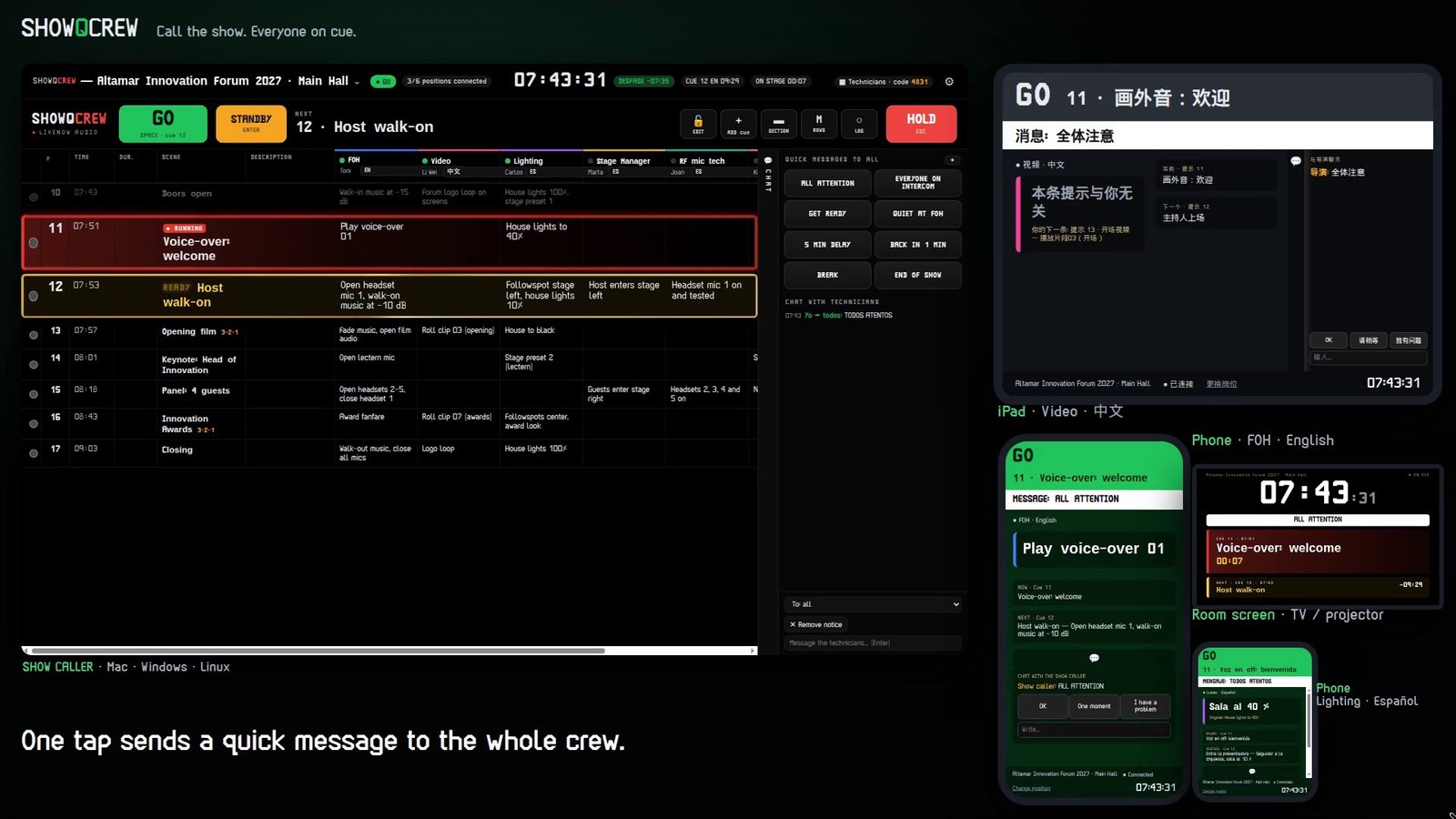
FOH reads "Open headset mic 1, walk-on music at −10 dB" in English. Video reads its own order in Chinese. Lighting, stage manager and mics, the same. When the running order changes, every screen says so.
Build the running order: scenes, times and an order for each position. Or import it from Excel, PDF or a photo.
Technicians scan the QR on the venue Wi-Fi, choose their position and language. Done.
STANDBY, GO, HOLD. Everyone gets their order at the same moment, and you see who is connected and ready.
From zero in one minute: event type, crew, languages, and the running order is ready. Or import yours.
QR for the crew, STANDBY, GO, READY, chat and HOLD, on iPad, phones and the room screen.
GO, STANDBY and HOLD on physical keys, with the live state of the show on every key.
Version 1.3.3 · 14 days free, then activate it with your licence key.
macOS 11 or later · Windows 10/11 64-bit · Linux 64-bit. The AppImage needs libfuse2 on Ubuntu 22.04 or later (sudo apt install libfuse2).
No. They open the address or scan the QR on the venue Wi-Fi, in any browser. Phones, tablets and laptops, new or old.
No. Everything runs on the local network of the venue. Internet is only used once, to activate the licence.
One licence per company covers 3 computers: the show computer, the backup and the office, Mac, Windows or Linux in any mix. To move it, deactivate it on one computer.
As many as your network can hold: every position and every screen you need.
No. ShowQCrew helps you give clear orders, but Wi-Fi, a network or a device can fail in the middle of a show. Always keep the intercom as backup.